
I once worked at a company where the business model revolved around sending emails that people would love to open. I vividly remember our first billion-email day — a milestone that was both exciting and revealing. This achievement wasn’t solely due to organic growth; we strategically ramped up our email efforts to meet financial targets. Through this experience, I learned a great deal about crafting engaging emails. Over time, I developed a set of principles for writing emails that not only capture attention but also drive action.
The foundation of all these principles is simple:
First, it’s on you to communicate well…
…not on the recipient to digest and internalize everything in their inbox. I occasionally hear leaders say, “Didn’t you read my email!? It had all that in there!” as if their emails are Brussel sprouts. “Eat your vegetables, children!” I mean… if you are serving Brussel spouts, you really should do it right.
Really, there’s just two types of email
An email is either convey information or get the recipient to take action. To write an effective email, simplicity is the key. You should either do one or the other, and trying to do both in a single email will dilute the efficacy of both aims.
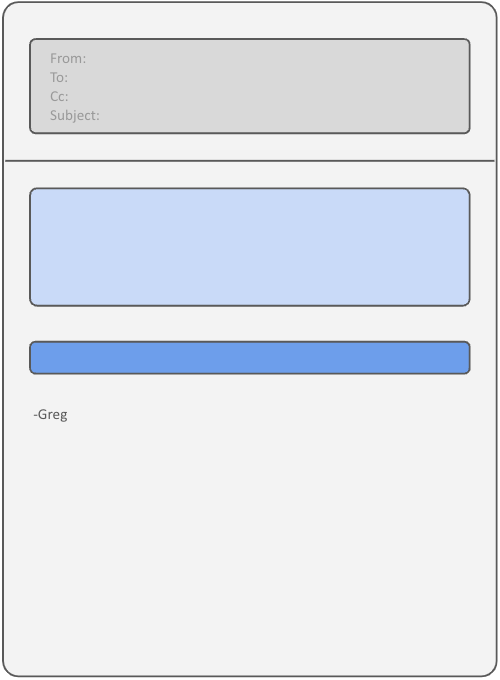
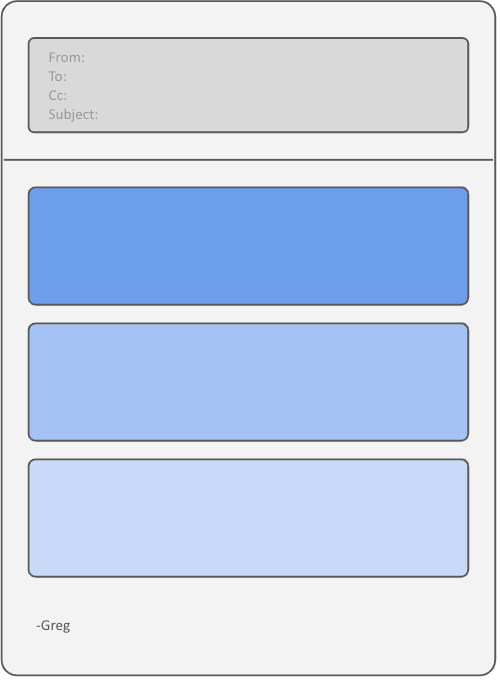
Depending on the type, I stick to a clear visible structure. Those are…
| Get them to do a thing | Get them to understand things |
I’m representing these visually first since that is honestly how people first experience them. They will open the email (hopefully) and be hit with the shape of it before they even start reading. They may think, “Ok, short email and a call-to-action.” or “Yowzers! That’s just a brute of text!” or “OMG. What am I even looking at?”
Another thing I often hear is “Customers don’t really read.” What they mean is that your product can have all kinds of explanatory text, but customers will generally not take the time. They just want to get something done by finding what to click and clicking it. Same is true for email. This is why I structure almost all my email to one of those two shapes… visually.
Let’s take a look at each.
Type 1: Get them to do a thing
When you need the recipient to take a specific action — such as filling out a form, attending a meeting, or simply answering a question — the key is clarity and simplicity. You want to make is clear what is needed, and make it easy for them to do it.
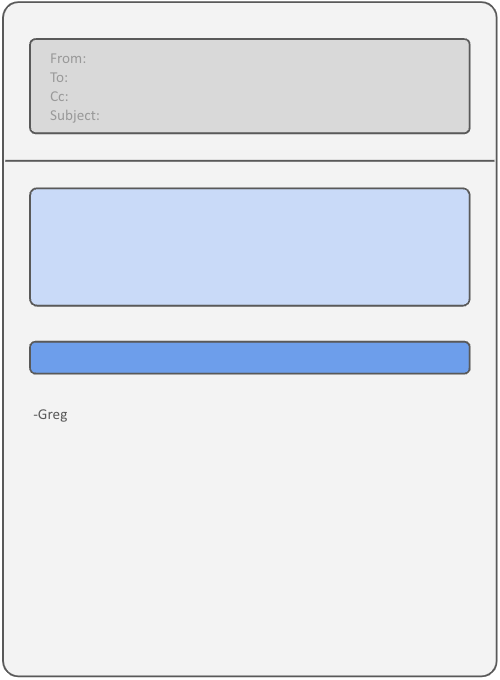
- Concise Explanation: Provide a brief explanation of what is needed, why it’s important, and any relevant deadlines. This should be no more than a few sentences. The goal is to make it easy for the recipient to understand what they need to do without overwhelming them with details.
- One Clear Call-to-Action: Use a single, prominent call-to-action. Whether it’s a link, button, or a simple sentence, make sure it stands out. Avoid cluttering the email with multiple links or requests, as this can confuse the recipient.
- Do not include any other links, not even a “more details” link. If more context is needed, you should either…
- Send a separate “Get them to understand things” email
- Add that context directly to the landing page of the call-to-action
- Add a postscript telling recipients to reach out with questions, preferably without including a link
An Example
Hello, Managers-
It’s time for teams across the organization to submit their requests for any needed cross-team support to complete their Q3 projects. These may include new capabilities needed from platform components or merely some consulting or anything else that will require material time from some other team. Please add those requests by following the link below by September 2.
[ Declare Your Q3 Dependencies]
Thanks,
-Greg
Here’s one I sent just this morning…
Hello-
Both my son and daughter are looking to participate in school sports in the fall. Their school would like Pre-participation Physical Evaluation forms to be completed prior to that. Unfortunately, the link you provided in February no longer works.
What is the process for this?
Thanks!
-Greg
Things to avoid
You may be temped to add a link to the documentation on the quarterly cross-team dependency planning process which could be useful context for some. You might also see you typed the phrase “Q3 projects” and be tempted to turn that into a link to the roadmap. It may also seem awesome to find phrases like “submit their requests” or “the link” and turn those into additional links to the call-to-action. I mean, if there’s more links, there’s more chances they’ll actually click one, right?
Really, don’t do any of these things. One link. Make it clear. Create zero cognitive load.
One other tip: A marketing colleague of mine once read an email from me and said, “You know… the best way to get someone to do a thing is to just tell them to do it.” I had written my mail in a passive way. It was probably something like “It would be helpful if you checked out the survey. Here is the link.” What this marketer was telling me was to change it to “Take the survey!”.
Type 2: Get them to understand things
When the purpose of your email is to convey information, structuring your message using the “inverted pyramid” format is highly effective. This format is commonly used in journalism.
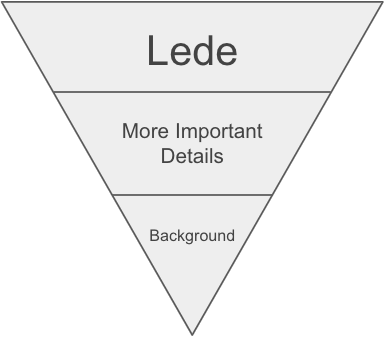
Begin with the most important information immediately. If there’s just one thing you want them to take away, write that first. Only after that should you follow with supporting details. End with some less important but relevant details, or some background. You should assume the audience will stop reading at any point. That might mean reading only the first sentence, or the first few.
In fact, there’s a bit of a fractal nature to this. The first paragraph is structured like that inverted pyramid, but so too are the paragraphs themselves.
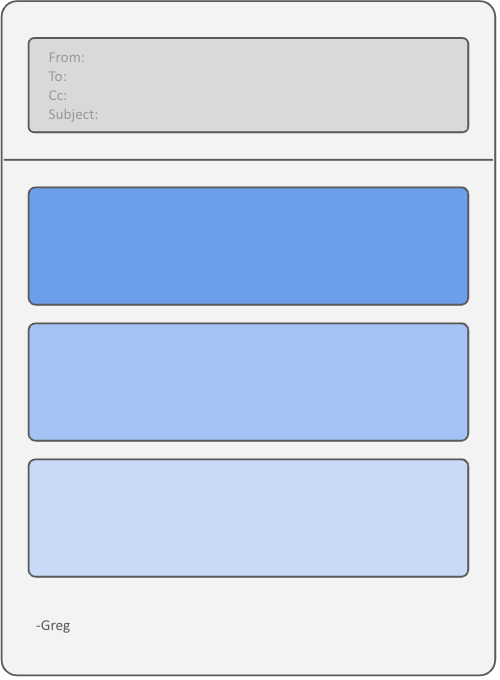
- Start with the Most Important Information: Begin with the key point you want your recipients to take away. This ensures that even if they stop reading after the first sentence, they still grasp the main message.
- Provide Supporting Details: After the main point, include important facts and details that support or explain the initial statement.
- Offer Additional Context: Conclude with less critical information or background details. This way, readers who are interested can dive deeper, while others can stop reading without missing the main point.
An Example
Hello, Managers-
We are institute a hiring freeze within the organization for the next few quarters. I understand that this will affect teams’ roadmaps for the year and we’ll be working with you all to determine the impact. There will be an exception process for critical roles representing single-points-of-failure, but they will require CFO approval. Current open roles will be closed this week and candidates currently in the interview process will be informed by the recruiting team.
As you know, the business is beginning an important pivot to capture the potential of AI. Our current line of products and services remain critical to our business and to our customers. However, our new company direction needs a similar pivot in our recruiting efforts.
This pivot will involve developing a deep recruiting pipeline for talented AI and machine learning engineers. Additionally, and as mentioned in the last All Hands meeting, we are also developing a program to train our current engineering staff on new AI technologies. You can find more information about that on the internal company wiki.
Please don’t hesitate to reach out to me with any questions, concerns or feedback.
-Greg
Things to avoid
It is natural to start an email like this by setting the context, describing the problem or starting with some couching, especially if you mean to convey bad news. It feels like a good way to tell your reader that you understand the situation and are empathetic. It may also help mentally prepare the audience for the tough news before actually delivering it. But don’t do this. Most advice on in-person delivery of bad news says to be direct, but empathetic. This is even more important in written communication where attention may not be fixed and there’s no opportunity for real-time clarification.
Even when writing about good or neutral news, people may structure their email with a “Context, Problem, Options, Details, Conclusion” format. Perhaps this is because it’s a common format to technical articles and design documents. However, the things you want to convey in email have a different nature. Someone wanting to dive into the details of a technical design will dive into those details. Someone simply getting an email will be much less engaged.
Speaking of technical articles, they often begin with an abstract — a short summary of the more detailed content that follows. I’ve seen folks include a similar concept at the beginning of emails. Sometimes it’s a “TL;DR:” or other such summary indicator. I very much recommend not doing this. When I see this, I jokingly think, “If this email is so long that you think I might not read it, then maybe fix the email.” But honestly I don’t believe anything requiring an abstract summary should even be an email.
Just make your “TL;DR:” the first sentence of the mail. Abstracts are great for technical writing since diving in requires an investment in time and mental energy. The abstract provides the potential reader the opportunity to decide whether they want to invest that effort. Any email you send should not have that problem.
People should want to read it, or don’t send it (as an email).
Additional Tips for Effective Email Writing:
- Craft Compelling Subject Lines: Your subject line is the first thing recipients see, so make it count. It should be concise, informative, and attention-grabbing, capturing the point of the entire email. Consider making your subject line the call-to-action or reiterate the first sentence of your informative email, such as “Declare Your Q3 Dependencies”, “School Athletics Process?” or “Hiring Freeze”.
- Know Your Audience: Tailor your email to the recipient’s needs and expectations. Consider their familiarity with the subject, their priorities, and what might prompt them to take action.
- Review Before Sending: Always review your email for clarity, grammar, and tone. If the email is critical, consider having a colleague review it as well. Ensure that all links work and that the email is free of typos.
- Follow Up Thoughtfully: If you don’t receive a response, consider following up after a reasonable amount of time. Be polite and direct in your follow-up, and reiterate the key message or action required. Pro Tip: If your first email went to a group, send individual followup emails. Personalize it to that individual. “Hi, Jake. I want to make sure you saw this request. Just checking because I know you are busy. Are you able to get to it by Tuesday? Let me know.”
- Timing: Send important emails early in the morning, but not too early. This is a bit of an email marketing tactic, but can improve your chances of getting your recipients attention. People start their day by checking their email. Once their day starts, and they are “in the zone”, any incoming email is more of a distraction and annoyance. Catch them when they are in “checking email” mode… but don’t send it too early. Try to get that email to the top of their inbox, not buried in the pile.
Writing effective emails is an essential skill in both professional and personal settings. By focusing on clarity, purpose, and structure, you can ensure that your emails are both engaging and effective. Remember, your goal is to make your email easy to read and act upon. Whether you’re asking someone to do something or simply sharing information, a well-crafted email respects the recipient’s time and attention, leading to better outcomes for both parties.
Start implementing these tips in your next email and see the difference.


 GregConklin.com
Leave a comment